Learn what Kvants Studio is, how its AI-assisted strategy workflow works, and how traders can build, backtest, validate, and deploy transparent strategies from one workspace.
Kvants Studio is an AI-assisted workspace for building, testing, and operating systematic trading strategies. It brings the work that usually lives across a code editor, a backtesting engine, spreadsheets, charting tools, and broker dashboards into one connected platform.
You can begin with a plain-English idea, turn it into an explicit set of trading rules, test those rules on historical market data, examine where the strategy succeeds or fails, and move a validated version into paper trading. More experienced users can inspect and edit the strategy directly, connect venues, export work, and use external AI agents through scoped access.
The shortest explanation is this:
Kvants Studio helps you move from “I have a trading idea” to “I have a strategy I can inspect, test, and operate.”
It is not an AI that simply announces whether to buy or sell. The product is designed around transparent strategies, repeatable research, and risk checks that remain visible to the person using it.
Why Kvants Studio exists
Building a systematic strategy normally requires several different skills and tools. A trader may need to source market data, write indicator logic, prevent lookahead bias, model fees and slippage, calculate performance metrics, manage strategy versions, connect an exchange or broker, and monitor the strategy after deployment.
That creates two common problems.
First, a good market idea can get lost in technical setup. The trader spends more time building infrastructure than testing the hypothesis. Second, convenient “AI trading” products can hide too much. They may return a signal or an attractive performance number without showing the exact rules, assumptions, or risks behind it.
Kvants Studio takes a different approach: AI helps construct and explain the strategy, while the strategy itself stays inspectable. The goal is to make systematic research more accessible without turning it into a black box.
How Kvants Studio works
The core workflow has four connected stages: build, backtest, validate, and deploy.
1. Describe the trading idea
You can start by describing a rule strategy in ordinary language. For example:
Buy BTC when the 20-period EMA crosses above the 50-period EMA on the four-hour chart. Exit on the reverse crossover, use a 3% stop-loss, and risk 2% per position.
The creation flow is built to collect the important parts of the idea: the market, timeframe, entry rule, exit rule, sizing, and risk control. You can also start from scratch when you already know exactly how you want to construct the strategy.
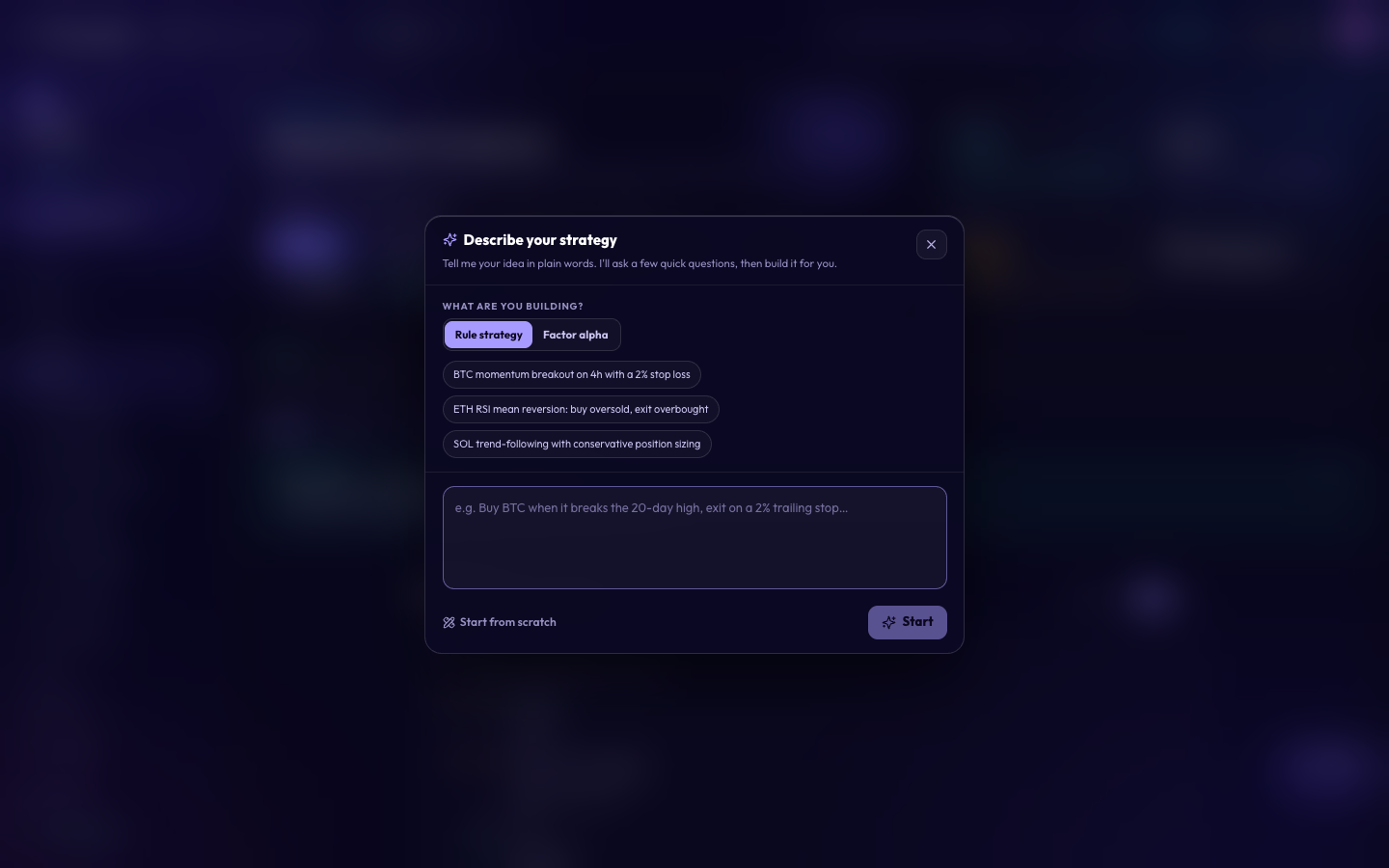 Start with a plain-language rule strategy or open a blank workspace.
The AI assistant is also available as a dedicated workspace. It can help create, modify, explain, or optimize a strategy while keeping the current strategy in context. That makes it useful for both the first draft and later iterations.
2. Inspect and edit the strategy
The result is not just a chat response. It becomes a saved strategy with explicit inputs, indicators, conditions, signals, sizing, risk rules, and execution assumptions.
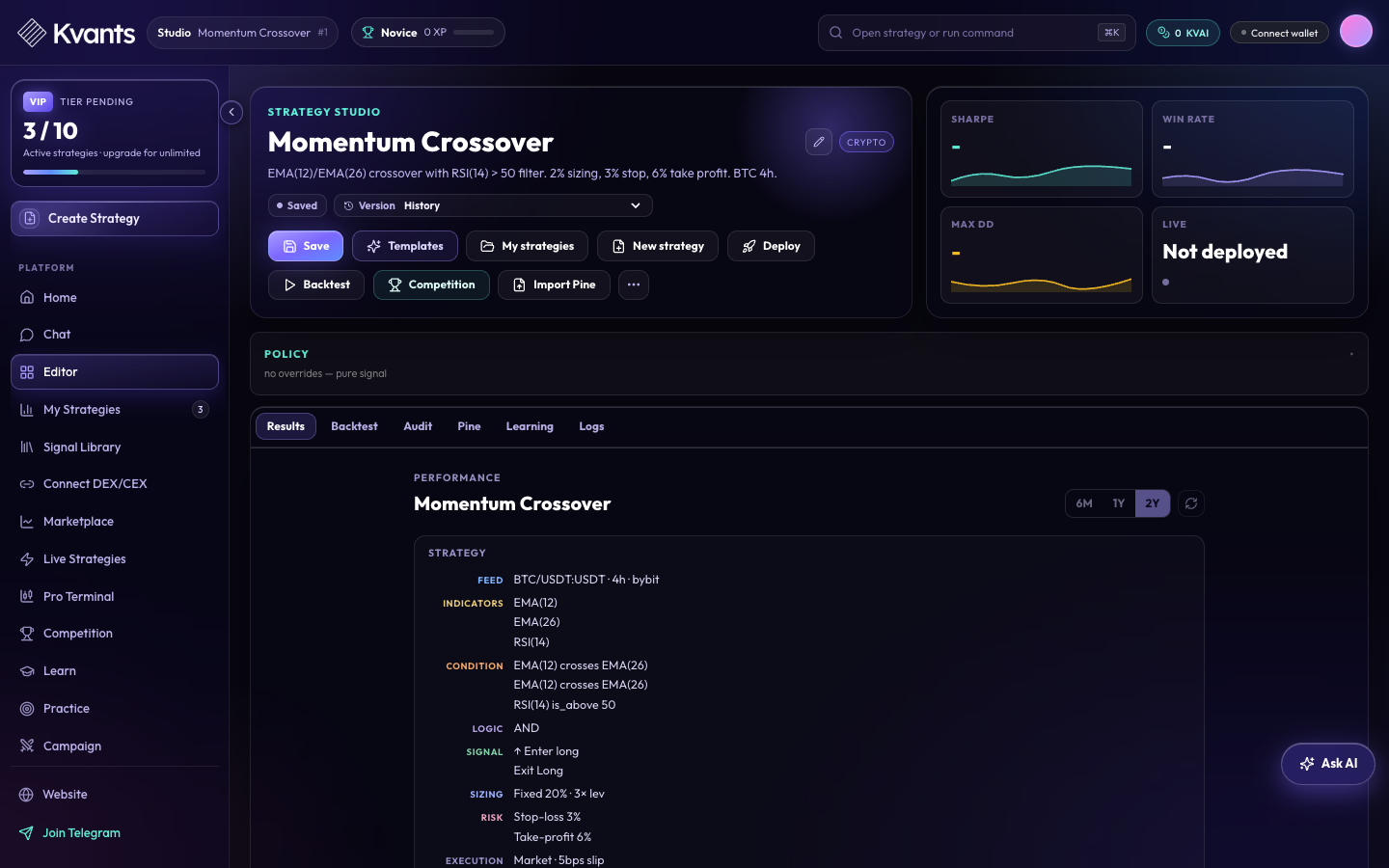 A strategy remains readable: its market feed, logic, position sizing, risk, and execution assumptions are visible in the workspace.
This transparency matters. If a backtest changes after you adjust an EMA period or stop distance, you can see what changed. If the logic is wrong, you can correct the rule instead of repeatedly prompting an opaque model and hoping for a different answer.
The workspace also keeps the practical parts of strategy development together: saving, version history, templates, backtesting, audit, Pine import or export, learning tools, logs, and deployment.
3. Backtest and challenge the result
A backtest asks a precise question: what would these rules have done over a chosen historical period, given the data and execution assumptions supplied to the engine?
Kvants Studio presents the result through an equity curve, performance metrics, a benchmark comparison, and a trade-by-trade log. The point is not to reduce the strategy to a single return number. It is to help you inspect the path that produced the result.
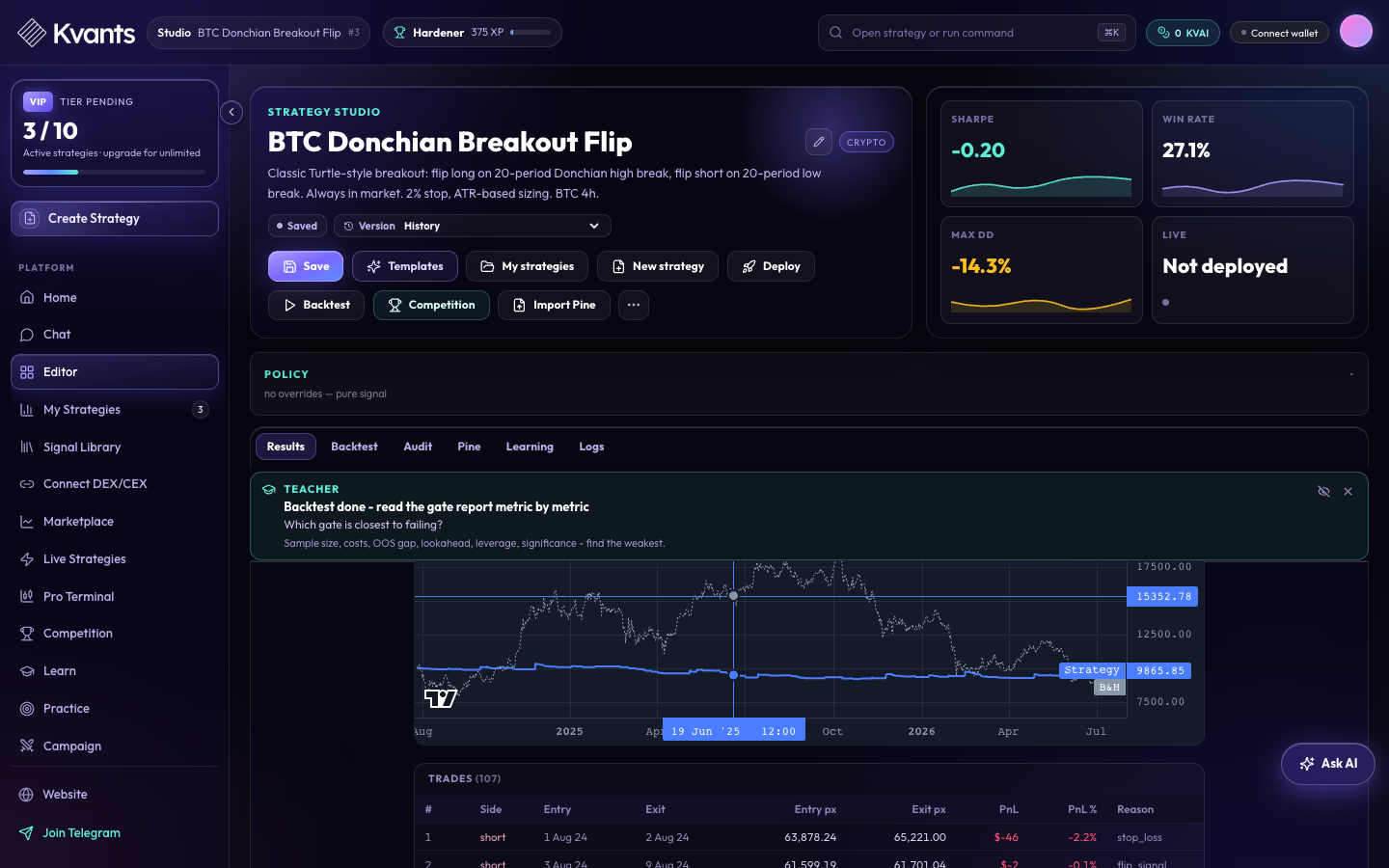 Backtest results combine top-level metrics with the equity path and every recorded trade.
Useful questions include:
- Did the result depend on only a handful of trades?
- How large and how long were the drawdowns?
- Does the edge survive estimated fees and slippage?
- Does performance remain stable when parameters move slightly?
- Does the strategy hold up outside the period used to develop it?
- What happens during a crisis or a market regime change?
Kvants includes validation and audit tools to make those questions part of the workflow. Depending on the strategy, you can use parameter sweeps, out-of-sample and walk-forward analysis, crisis stress tests, cost checks, and gate reports. The platform also keeps a strategy journal and a Strategy Brain so hypotheses, failures, and lessons can remain attached to the work instead of disappearing between sessions.
4. Move from research to paper trading
When a strategy is ready for forward testing, the deployment flow asks for the venue, paper or live mode, capital, maximum leverage, maximum drawdown, and maximum open positions.
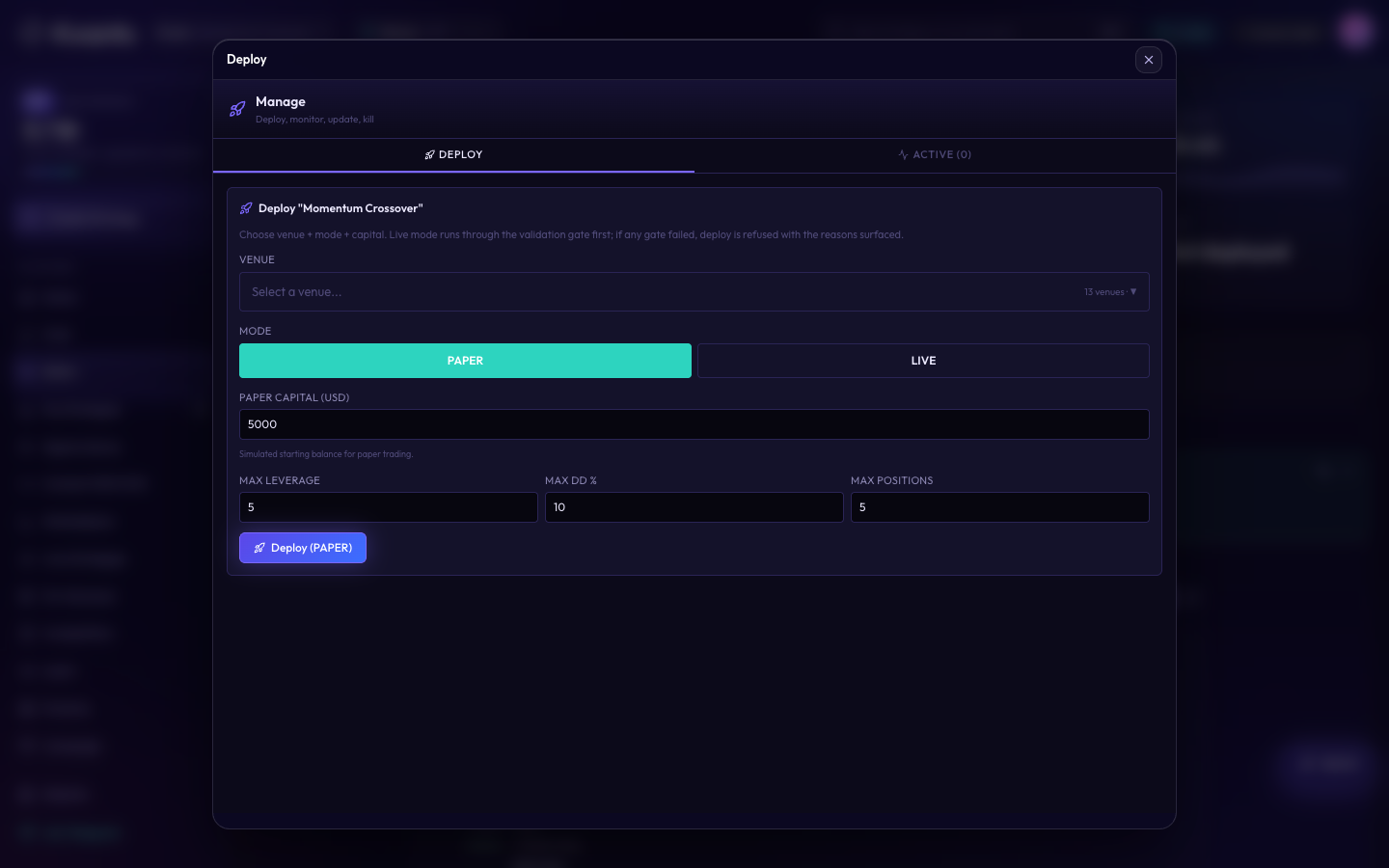 Deployment makes capital and risk limits explicit before the strategy is started.
Paper trading is the natural next step after historical testing. It shows how the strategy behaves against live market conditions without placing real capital at risk. A strategy that looked stable in a backtest may behave differently when faced with current spreads, latency, changing liquidity, or a new regime.
Kvants supports connected crypto venues and Alpaca-based stock workflows. Live trading remains a higher-risk step and should only follow careful review and meaningful paper observation. No backtest, AI model, or validation score can guarantee future performance.
What you can do inside Kvants Studio
Kvants Studio is broader than a visual strategy builder. Its main product areas include:
AreaWhat it is forAI Strategy AssistantCreate, modify, explain, and optimize strategies in natural language.Strategy StudioInspect rules, edit parameters, save versions, audit logic, and run tests.Backtesting and validationReview metrics, equity curves, trades, costs, parameter stability, walk-forward results, and stress periods.Signal Library and LearnExplore systematic signals, verified strategy patterns, lessons, and practice challenges.Strategy Brain and JournalPreserve the hypothesis, regime beliefs, failure patterns, and lessons for each strategy.Marketplace and CompetitionDiscover community strategies, share eligible work, and compare verified competition entries.Pro and Trading TerminalsCombine live charts, market context, regime reads, news, and an AI co-pilot.Connections and deploymentLink supported brokers, exchanges, wallets, or scoped external agents, then manage paper or approved live workflows.
You do not need to use every area at once. A first-time user can stay with the simple loop: describe one strategy, inspect it, run one backtest, and read the result carefully.
Who Kvants Studio is for
Kvants Studio is useful for several kinds of users:
- Traders with clear ideas but limited coding experience who want to express rules and test them systematically.
- Quant-curious investors who want to learn how signals, risk controls, costs, and validation fit together.
- Developers and quantitative researchers who want a faster interface for iteration, audit, versioning, export, and deployment operations.
- Trading teams and strategy creators who need a shared, inspectable object instead of a strategy scattered across chat messages, notebooks, and screenshots.
- AI-agent users who want to connect tools such as Codex, Claude Code, Cursor, or ChatGPT through scoped MCP credentials.
It is not a substitute for market knowledge. The platform can make a rule easier to build and test, but it cannot turn a weak hypothesis into a durable edge.
What Kvants Studio is not
A clear definition also needs boundaries.
Kvants Studio is not a promise of profitable trading. Historical performance does not predict future returns, and a strategy can lose money even after passing every available check.
It is not a hidden signal-selling service. The central object is a strategy you can inspect, edit, and evaluate.
It is not a reason to skip validation. AI can speed up construction, but faster construction makes disciplined testing more important, not less.
And it is not only for live trading. Research, education, practice, paper trading, and strategy documentation are valuable outcomes on their own.
A sensible first session
If you are opening Kvants Studio for the first time, keep the experiment small:
- Choose one liquid market and one timeframe.
- Write an entry rule, an exit rule, and a stop-loss in one paragraph.
- Let the assistant create the first version.
- Read every strategy rule before running it.
- Backtest across a meaningful period and inspect the trades, not only the headline return.
- Change one assumption at a time and compare the result.
- Use paper trading before considering any live deployment.
That single session demonstrates the real value of the platform: a trading idea becomes an object you can examine and improve.
Frequently Asked Questions
Do I need to know how to code to use Kvants Studio?
No. You can begin with plain language, templates, and guided strategy tools. Coding and market-structure knowledge can still help with more advanced work, but they are not required to create and test a first rule-based strategy.
Can Kvants Studio trade stocks and crypto?
Yes. Kvants includes crypto venue connections and stock workflows built around Alpaca. The available data, instruments, and deployment modes depend on the connection and account configuration you use.
Does Kvants Studio guarantee that a strategy will make money?
No. Backtests, walk-forward analysis, stress tests, and paper trading are research tools, not guarantees. Markets change, execution differs from simulation, and every trading strategy carries the risk of loss.
Is Kvants Studio just an AI chatbot for trading?
No. Chat is one way to interact with the platform. The larger product includes an inspectable strategy workspace, backtesting, validation, learning, strategy memory, connections, deployment controls, and monitoring tools.
Can I use Kvants Studio without deploying a strategy live?
Yes. You can use it for education, idea development, historical testing, audits, paper trading, export, and strategy documentation without enabling live trading.
Start with one idea
The best way to understand Kvants Studio is to test a strategy you already have in mind. Make the rules specific, keep the first version simple, and treat every result as evidence to investigate rather than a verdict to accept.
Open Kvants Studio and build your first strategy →
Risk note: Trading involves substantial risk, including the possible loss of capital. Kvants Studio provides research, testing, and execution software; it does not provide financial advice or guarantee performance.